> ## Documentation Index
> Fetch the complete documentation index at: https://documentation.uponai.com/llms.txt
> Use this file to discover all available pages before exploring further.
# Check Calendar Availability
> Let your agent check real-time calendar availability using Cal.com during a call.
## Overview
The Check Calendar Availability tool connects your agent to Cal.com so it can look up open time slots in real time based on what the caller requests.
***
## Setup
Sign up at [cal.com](https://cal.com) if you don't have one.
In your Cal.com dashboard, create an event type with your preferred duration, availability, and settings.
You'll need two values from Cal.com:
| Credential | Where to find it |
| ------------- | --------------------------------------- |
| Event Type ID | The numeric ID in your event type's URL |
| API Key | Settings → Developer → API Keys |
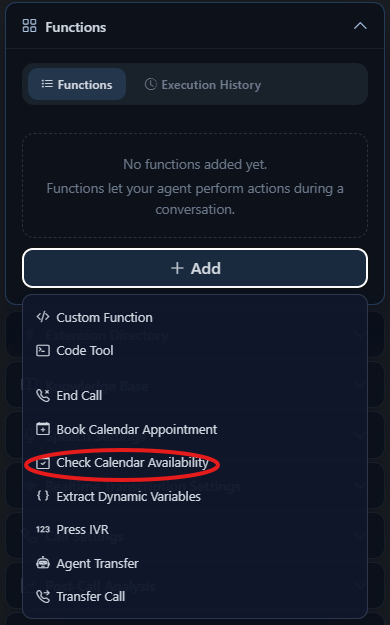
In your agent's Functions section, click **+ Add** and select **Check Calendar Availability**.
 Enter:
* Tool name
* Cal.com API Key
* Event Type ID
* Tool description
* Timezone (optional)
Tell the agent exactly when to check availability:
```txt theme={null}
When the user states a time range, check calendar availability by calling the check_calendar_availability function.
```
Be explicit in your prompt about when to invoke this function. Vague instructions lead to inconsistent behavior.
Enter:
* Tool name
* Cal.com API Key
* Event Type ID
* Tool description
* Timezone (optional)
Tell the agent exactly when to check availability:
```txt theme={null}
When the user states a time range, check calendar availability by calling the check_calendar_availability function.
```
Be explicit in your prompt about when to invoke this function. Vague instructions lead to inconsistent behavior.