> ## Documentation Index
> Fetch the complete documentation index at: https://documentation.uponai.com/llms.txt
> Use this file to discover all available pages before exploring further.
# MCP
> Extend your agent with Model Context Protocol tools from connected MCP servers.
## Overview
MCP (Model Context Protocol) lets you connect external tool servers to your agent, giving it access to a wide range of capabilities without building custom functions from scratch.
***
## Setup
In your agent's Functions section, click **+ Add MCP** and fill in the connection details.
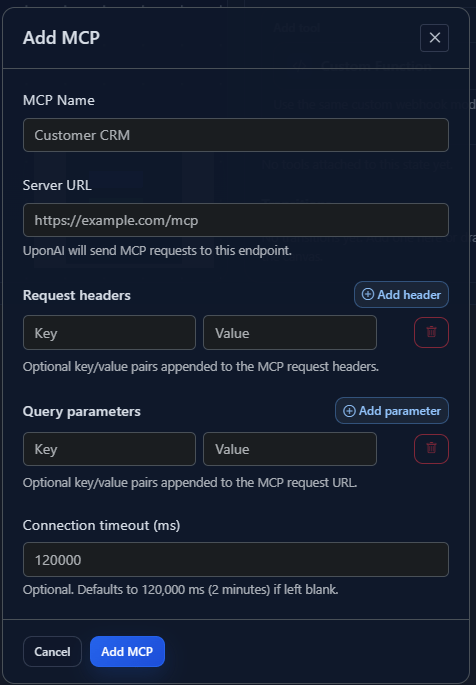 Optionally add custom headers to be sent with requests to your MCP server.
Optionally append query parameters to the MCP server endpoint URL.
Select from the available tools provided by your connected MCP server.
Map response values to dynamic variables for use later in the conversation:
```txt theme={null}
Extract the user_name from the MCP response and store it as {{user_name}}.
```
Save your MCP tool configuration to make it available to your agent.
Tell the agent explicitly when to invoke the MCP tool:
```txt theme={null}
When the user asks for their account details, call the get_account_info MCP tool.
```
Always instruct your agent in the prompt when to trigger MCP tools. The agent won't reliably infer usage from tool names alone.
Optionally add custom headers to be sent with requests to your MCP server.
Optionally append query parameters to the MCP server endpoint URL.
Select from the available tools provided by your connected MCP server.
Map response values to dynamic variables for use later in the conversation:
```txt theme={null}
Extract the user_name from the MCP response and store it as {{user_name}}.
```
Save your MCP tool configuration to make it available to your agent.
Tell the agent explicitly when to invoke the MCP tool:
```txt theme={null}
When the user asks for their account details, call the get_account_info MCP tool.
```
Always instruct your agent in the prompt when to trigger MCP tools. The agent won't reliably infer usage from tool names alone.