Documentation Index
Fetch the complete documentation index at: https://documentation.uponai.com/llms.txt
Use this file to discover all available pages before exploring further.
Create your server endpoint
Set up an HTTP/HTTPS endpoint that accepts POST requests.import { UponAI } from "uponai-sdk";
import express from "express";
const app = express();
app.use(express.json());
app.post("/webhook", (req, res) => {
const { event, call } = req.body;
switch (event) {
case "call_started":
console.log("Call started", call.call_id);
break;
case "call_ended":
console.log("Call ended", call.call_id);
break;
case "call_analyzed":
console.log("Call analyzed", call.call_id);
break;
default:
console.log("Unknown event:", event);
}
res.status(204).send();
});
Test your endpoint locally
Test with this curl command before going live:curl --location 'localhost:8080/webhook' \
--header 'Content-Type: application/json' \
--data '{
"event": "call_ended",
"call": {
"call_type": "phone_call",
"from_number": "+12137771234",
"to_number": "+12137771235",
"direction": "inbound",
"call_id": "Jabr9TXYYJHfvl6Syypi88rdAHYHmcq6",
"agent_id": "oBeDLoLOeuAbiuaMFXRtDOLriTJ5tSxD",
"call_status": "registered",
"start_timestamp": 1714608475945,
"end_timestamp": 1714608491736,
"disconnection_reason": "user_hangup",
"transcript": "..."
}
}'
Expose your local endpoint
Use ngrok to make your local server reachable:# Install ngrok
brew install ngrok/ngrok/ngrok
# Expose your local server
ngrok http http://localhost:8080
Your webhook URL will be something like https://84c5df474.ngrok-free.dev/webhook. Register your webhook endpoint
Choose one of two options:
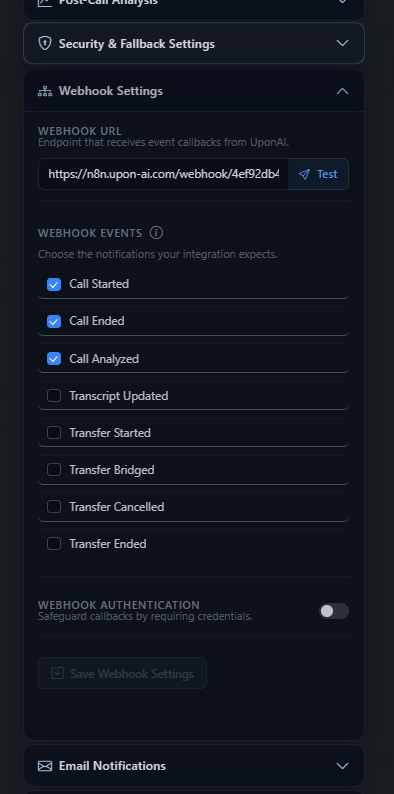
- Account-level webhook — Set up in Settings > Webhooks tab. Fires for all agents in your account.
- Agent-level webhook — Set via the
webhook_url field on the agent. When set, the account-level webhook will NOT fire for that agent.
Verify your webhook
Start a web call in the dashboard to confirm the webhook fires correctly.